
WordBoard Keyboard
Save time typing
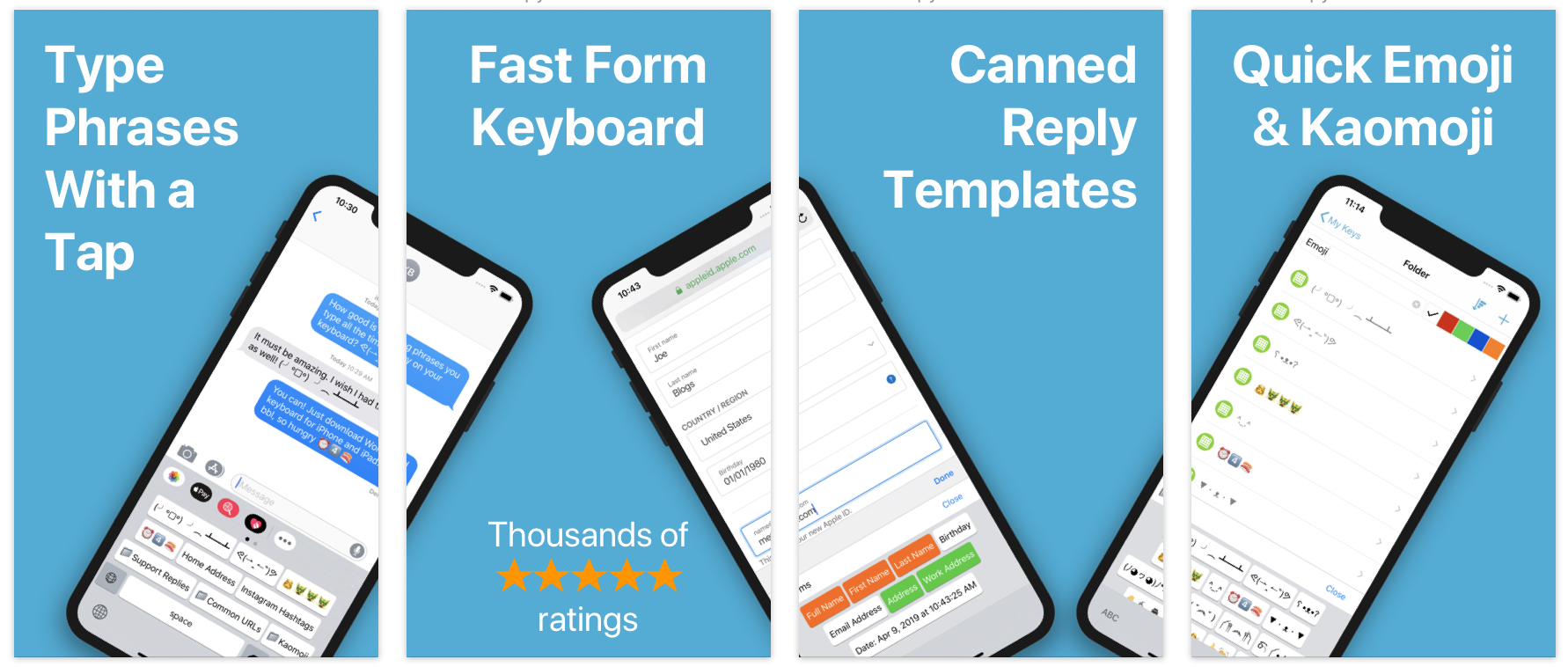
WordBoard is a custom iPhone and iPad keyboard that lets you save text snippets, templates, and quick replies, then insert them instantly from any app.
Use it for copy and paste, customer replies, favorite emoji sets, kaomoji, contact details, and any text you type often.
Instead of switching between apps or memorizing shortcuts, you tap the exact key you need and keep typing.
If you want an iPhone app for text snippets, templates, quick replies, or a faster copy and paste workflow, WordBoard lets you save reusable keys and insert them from any app.
Create custom keys that instantly insert the text you need. No more switching between Notes and your keyboard. WordBoard keeps your most used snippets one tap away.
Use dynamic placeholders like {{ DATE }} or {{ CLIPBOARD }} and WordBoard fills them in automatically when you paste.
Group snippets into folders for work, personal use, social media, or support. Find what you need fast while typing.
On Apple Intelligence compatible devices, AI Keys can rewrite, translate, and transform selected text directly from your keyboard. Learn more on the AI Keys for iPhone page.
Unlike iOS Text Replacement, WordBoard keeps formatting, supports folders and templates, and does not rely on memorized shortcuts. It is built for copy and paste workflows, long replies, and reusable text you want to tap instead of type.
See the full comparison on the text replacement keyboard for iPhone page.
WordBoard is a strong TextExpander alternative for iPhone and iPad when you want visible snippet keys instead of typed abbreviations. Read the full WordBoard vs TextExpander comparison.
Use WordBoard anywhere the iOS keyboard works, including Messages, Mail, WhatsApp, Instagram, Slack, Notes, and more.
To enable the keyboard, allow Full Access in Settings. This only allows WordBoard to share data between the app and the keyboard. WordBoard does not use network access to collect your data.
Begin with 6 free keys. Upgrade to Pro for unlimited keys, hashtag imports, and contact info integration.
Apple - Best New App
TechCrunch - useful for those who run their businesses from their mobile phones.
I've been using WordBoard for the past couple of months, and I'm delighted with it! I have "custom" buttons for all the information I use on a regular basis: name, address, phone number, email address, some account settings; when I'm filling out an online form virtually all the data I need is available to be accessed in a split second. And not only does it save time - it ensures accuracy. I don't have to worry that I might have entered incorrect information; it's pre-loaded, and I don't have to watch the character display to make sure that I don't screw up! It's a WONDERFUL program - EVERYBODY should use WORDBOARD!
Saves me hours each day with email templates.
Exactly what I needed, I didn’t want to give up the stock keyboard and this compliments it perfectly. I’m using it to reply to support emails using a bunch of templates I used to have to copy and paste.
What is WordBoard?
WordBoard is a custom iOS keyboard that lets you copy, paste, and insert saved text snippets directly while typing.
How does WordBoard help me type faster on iPhone?
Instead of retyping or switching apps to copy and paste, WordBoard inserts your saved text with a single tap.
Is WordBoard good for copy and paste on iPhone?
Yes. WordBoard makes copy and paste faster, easier, and more organized than using Notes or the clipboard alone.
Can I use WordBoard for text snippets and templates?
Yes. WordBoard supports reusable snippets, templates, quick replies, and formatted text.
Does WordBoard work in all apps?
Yes. WordBoard works anywhere the iOS keyboard works.
Is WordBoard better than iOS text replacement?
WordBoard keeps formatting, supports folders and templates, and you do not have to remember shortcuts.
Is WordBoard free?
WordBoard includes 6 free keys, with a Pro upgrade for unlimited keys and advanced features.
Does WordBoard collect my data?
No. WordBoard does not collect or transmit your data.