Copy & Paste Keyboard for iPhone
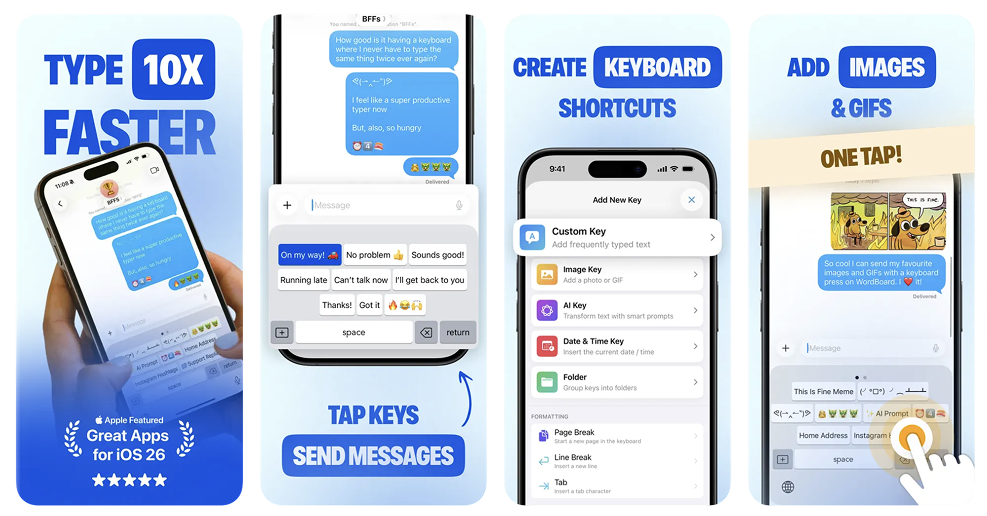
WordBoard is a copy & paste keyboard for iPhone that lets you save text snippets and insert them instantly. Stop switching between Notes and the clipboard and paste what you need with a single tap.
Build a custom iPhone copy & paste keyboard with keys for phrases, links, addresses, emails, and any text you reuse often.
If you are evaluating WordBoard against TextExpander, see the full TextExpander alternative for iPhone and iPad comparison.
Why use a copy & paste keyboard on iPhone?
A dedicated copy & paste keyboard keeps your most-used text ready in one place. Instead of retyping or hunting through old messages, you can paste the exact text you want from your keyboard.
Copy & paste keyboard iPhone features
- Create custom keys for snippets, templates, and quick replies.
- Organize your copy & paste keys into folders by task or project.
- Insert text instantly without leaving your current app.
- Use it everywhere the iOS keyboard works.
Copy & paste keyboard for iPhone in action
Auto-paste your clipboard with the CLIPBOARD variable
WordBoard keys are not limited to fixed text. Add the {{ CLIPBOARD }} variable to any key and it inserts whatever is currently on your clipboard at the moment you tap it. That means you can copy an address, an order number, or a link elsewhere, then tap a saved WordBoard key to auto-paste it straight into a template instead of pasting it manually and retyping the text around it.
This is useful for copy-and-paste-heavy workflows: paste a customer's order number into a support reply template, drop a copied link into a saved message format, or insert whatever you just copied into the same reusable phrase every time.
FAQ
What is a copy & paste keyboard for iPhone?
It is a keyboard that stores your favorite text and lets you paste it instantly while you type.
How do I set up a copy & paste keyboard iPhone workflow?
Download WordBoard, create your snippet keys, organize them into folders, and enable the keyboard in iOS settings.
Does a copy & paste keyboard iPhone setup work in every app?
Yes. Once enabled, you can use it in Messages, Mail, Notes, social apps, and more.
How do I auto-paste my clipboard on iPhone?
Add the {{ CLIPBOARD }} variable to a WordBoard key. Copy any text, then tap that key to insert your clipboard content automatically instead of pasting it manually.
Does WordBoard have a clipboard manager or clipboard history?
No. WordBoard does not keep a history of everything you copy. Instead, the {{ CLIPBOARD }} variable inserts whatever is on your clipboard right now into a saved key, which covers most copy-and-paste workflows without needing a full clipboard history tool.
Get started
Download WordBoard and start saving your most used text in minutes. You can also explore the Apple Intelligence keyboard for iPhone page for translation and rewrite features.
Looking for a more flexible version of iOS shortcuts? See the text replacement keyboard for iPhone page.
Need more tips? Visit the WordBoard blog or return to the WordBoard home page.