WordBoard for iPhone and iPad
Save text snippets, templates, and quick replies, then insert them anywhere with one tap from your keyboard.
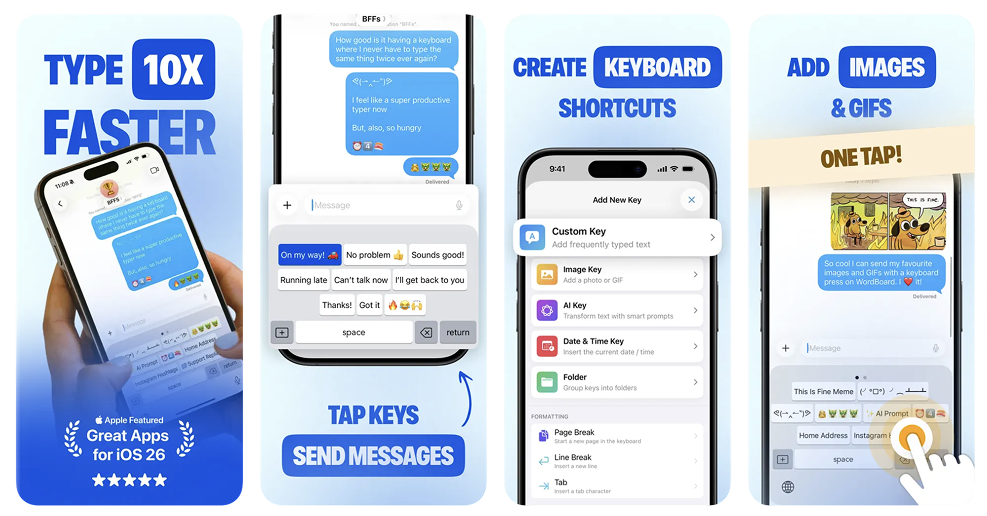
Save once
Create keys for phrases, replies, addresses, and templates you type every day.
Insert anywhere
One tap inserts your saved text in Messages, Mail, WhatsApp, Notes, and every other app.
Stay organised
Group keys into folders by topic so the right ones are always fast to find.
Smart templates and variables
Use dynamic placeholders like {{ DATE }} or {{ CLIPBOARD }} and WordBoard fills them in automatically when you insert. Build templates for emails, support replies, and any message with changing details.
AI Keys for Apple Intelligence devices
On Apple Intelligence compatible devices, AI Keys can rewrite, translate, and transform selected text directly from your keyboard, without switching apps. Learn more on the Apple Intelligence keyboard for iPhone page.
WordBoard vs iOS text replacement
Unlike iOS Text Replacement, WordBoard keeps formatting, supports folders, and does not require memorized shortcuts. Built for tap-to-insert workflows and long replies. See the full comparison.
TextExpander alternative for iPhone
WordBoard is a strong TextExpander alternative when you want visible snippet keys instead of typed abbreviations. Read the WordBoard vs TextExpander comparison.
Best iPhone keyboard apps for 2026
Not sure which third-party keyboard is right for you? See our full roundup of the best iPhone keyboard apps and extensions.
Kaomoji keyboard for iPhone
Want to set up Japanese text faces and save your favourites? Read the kaomoji keyboard for iPhone guide.
Use it for
What customers are saying
A GREAT Timesaver!
I've been using WordBoard for the past couple of months, and I'm delighted with it! I have "custom" buttons for all the information I use on a regular basis: name, address, phone number, email address, some account settings; when I'm filling out an online form virtually all the data I need is available in a split second. And not only does it save time — it ensures accuracy.
So useful!
Saves me hours each day with email templates.
Fantastic
Exactly what I needed. I didn't want to give up the stock keyboard and this complements it perfectly. I'm using it to reply to support emails using templates I used to have to copy and paste.
Start free
Begin with 6 free keys. Upgrade to Pro for unlimited keys, hashtag imports, and contact info integration.
Built for privacy
WordBoard does not use network access to collect your data. Full Access in Settings is required only for iCloud sync between the keyboard and the app.
FAQ
What is WordBoard?
WordBoard is a custom iOS keyboard that lets you copy, paste, and insert saved text snippets directly while typing.
How does WordBoard help me type faster on iPhone?
Instead of retyping or switching apps to copy and paste, WordBoard inserts your saved text with a single tap.
Is WordBoard good for copy and paste on iPhone?
Yes. WordBoard makes copy and paste faster, easier, and more organised than using Notes or the clipboard alone.
Can I use WordBoard for text snippets and templates?
Yes. WordBoard supports reusable snippets, templates, quick replies, and formatted text.
Does WordBoard work in all apps?
Yes. WordBoard works anywhere the iOS keyboard works.
Is WordBoard better than iOS text replacement?
WordBoard keeps formatting, supports folders and templates, and you do not have to remember shortcuts.
Is WordBoard free?
WordBoard includes 6 free keys, with a Pro upgrade for unlimited keys and advanced features.
Do I have to buy WordBoard Pro separately for iPhone and iPad?
No. Sign in with the same Apple ID on both devices, buy Pro once, then use Restore Purchase on the second device to unlock it there at no extra charge.
Does WordBoard collect my data?
No. WordBoard does not collect or transmit your data.
Can I open the WordBoard app without leaving what I'm typing?
Yes. With Full Access enabled, tap the + button on the WordBoard keyboard and choose Open App to jump straight into WordBoard to add or edit keys, then switch back to keep typing.